
2 portals
Separate exports
Uber and Bolt settle separately. To know what one car earns in total, someone merges both exports in a spreadsheet, every week.
Connect your Uber Fleet and Bolt Fleet accounts and one dashboard shows revenue, net after platform commission and cost per kilometre for every vehicle and every driver. You see at a glance which cars carry your fleet and which ones quietly cost you money each month.
Last updated:
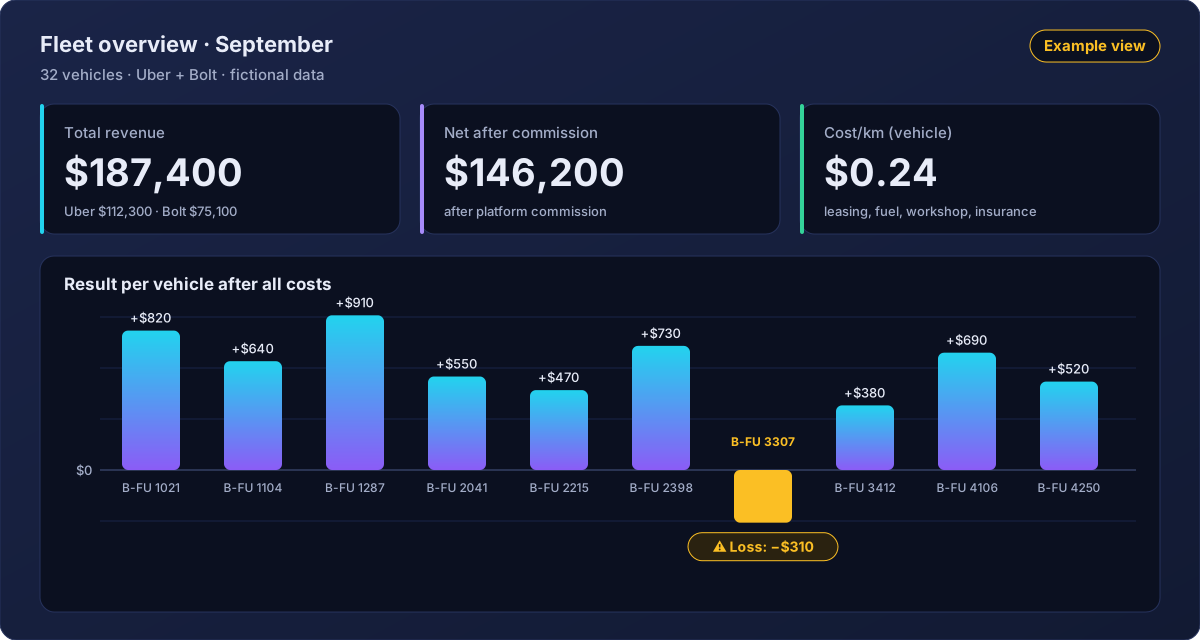
Once a fleet passes about 20 vehicles, checking the Uber and Bolt portals separately stops working. Each shows trips and revenue for its own side – and neither knows what your cars cost.
Uber and Bolt settle separately. To know what one car earns in total, someone merges both exports in a spreadsheet, every week.
Leasing, fuel, workshop and insurance appear in no platform portal, so a car's revenue says nothing about its profit.
A car with decent revenue can still end the month in the red after costs, and the fleet total won't show it. (Example below)
German tax law requires accounting vouchers to be kept for eight years, books and records for ten.
§ 147(3) AO · Statute (German)
Most fleet owners know their total revenue to the euro. Far fewer know what a single car leaves behind after platform commission, driver pay and running costs, because those numbers live in five places: the Uber portal, the Bolt portal, payroll, workshop invoices and the fuel card.
The example on the right compares two vehicles from the same fleet. The van brings in almost as much as the sedan, yet after leasing, fuel, insurance and workshop it ends in the red. In the fleet total that loss disappears; only a per-vehicle view brings it to the surface.
That is exactly what happened to one operator using this dashboard: he found a van that was losing him a few hundred euros every month, and could finally decide what to do – a different area, a different driver, or hand the vehicle back.
The same logic works per driver: how much net does a shift bring in, and what does the driver really earn per hour once idle time is counted?
| Item | B-FU 2041 Sedan | B-FU 3307 Van |
|---|---|---|
| Revenue Uber + Bolt | $6,400 | $5,600 |
| Platform commission | −$1,410 | −$1,230 |
| Net after commission | $4,990 | $4,370 |
| Driver costs | −$2,900 | −$2,900 |
| Leasing | −$590 | −$690 |
| Fuel | −$620 | −$680 |
| Insurance | −$210 | −$260 |
| Workshop | −$120 | −$150 |
| Result | +$550 | −$310 |
| Kilometres driven | 7,200 | 6,100 |
| Vehicle cost per km | $0.21 | $0.29 |
All values are fictional. The dashboard takes the actual commission from your Uber and Bolt statements. Vehicle cost per km = (leasing + fuel + insurance + workshop) ÷ km.
Everything you need to run 21 to 50 vehicles – no exports, no formulas.
Link both platform accounts once. From then on, trips and revenue arrive automatically – split by platform and combined per vehicle and driver.
Example view, fictional values
Revenue minus platform commission for every car and every driver – the fair basis for comparing vehicles.
Calculated per vehicle from its costs and the kilometres driven.
Workshop, fuel, insurance and leasing assigned to the right vehicle.
What your drivers actually generate per hour, not just per trip.
HU (the German roadworthiness test), insurance, Konzession (your operating licence) and other dates per vehicle, flagged before they expire. A car parked because of a missed deadline earns nothing.
If your current overview can't answer one of these within a minute, you're making fleet decisions without the numbers.
Revenue doesn't decide it – the result after commission, driver and running costs does.
In the dashboard: result per vehicle, negatives flagged.
Lots of trips don't mean lots of net. Long idle times drag the hourly value down.
In the dashboard: net per driver and real hourly earnings.
A rising cost per km is an early sign that a car is getting expensive: repairs, consumption, insurance.
In the dashboard: cost per km per vehicle, with vendor costs.
Per-vehicle revenue analysis works with data that falls under statutory retention rules. Two provisions matter most for Mietwagen operators.
Books, records, inventories and annual accounts: ten years. Accounting vouchers (Buchungsbelege): eight years. Business letters received and sent, and other tax-relevant documents: six years. The eight-year period applies in the version in force since 1 January 2025, including to documents whose old period had not yet expired on that date.
§ 147(1) and (3) AO · Statute (German) · Application: Art. 97 § 19a EGAO · Statute (German)
Under the Passenger Transport Act (PBefG), a Mietwagen operator must record the receipt of every booking at the company base or home, on paper or electronically (an app-based system counts), and keep that record for one year.
§ 49(4) PBefG · Statute (German)
The dashboard doesn't replace your bookkeeping or your tax adviser. Which documents you must keep, and for how long, is best confirmed with your adviser for your specific case.
Set up your fleet once – plates, vehicle type, drivers. An existing list is enough.
Both platform accounts are linked. From then on, trips and revenue flow in automatically.
Revenue per driver and vehicle, cost per kilometre and upcoming deadlines at a glance.
700+
Mietwagen and taxi companies use this software to manage drivers, vehicles, platform data and deadlines in one place – instead of spreadsheets and WhatsApp groups.
One operator used it to find a van that was losing a few hundred euros every month. It never showed up in the fleet total.
Anonymised example from a Mietwagen operator
from $5.99 per driver/month
Connect your Uber Fleet and Bolt Fleet accounts to Flottenumsatz. Revenue from both platforms then flows into one dashboard automatically, broken down by vehicle and driver and shown after platform commission. No more exporting two portals and merging them in Excel.
Revenue is the fare the platform bills for your trips. Net after commission is what reaches you once the platform has taken its cut. Drivers, leasing, fuel, insurance and workshop bills are all paid out of that net amount, which is why Flottenumsatz compares vehicles on net, not on revenue.
Add up all costs of one vehicle for a period, such as leasing or depreciation, fuel or charging, insurance and workshop, and divide the total by the kilometres driven in that period. Flottenumsatz does this automatically for every vehicle once vendor costs are recorded.
A vehicle loses money when its net after commission does not cover driver and vehicle costs. High revenue alone tells you little. Flottenumsatz shows the result after all costs for each vehicle and flags negative values. One operator found a van this way that was losing a few hundred euros every month.
Under § 147(3) of the German Fiscal Code (AO), books and records must be kept for ten years, accounting vouchers (Buchungsbelege) for eight years and other tax-relevant documents for six years. The eight-year period applies in the version in force since 1 January 2025. For Mietwagen, § 49(4) PBefG also requires every incoming order to be recorded and kept for one year. Check individual cases with your tax adviser.
From $5.99 per driver per month. Setup takes about 48 hours: upload vehicles and drivers, connect Uber Fleet and Bolt Fleet, and the dashboard shows revenue per driver and vehicle, cost per kilometre and upcoming deadlines. There is a 2-day free trial, no credit card required.
We'll show you what revenue, net and cost per kilometre look like for your own vehicles.
Leave your details — we'll be in touch this week.